Payment
Account review
How do I know what my Account Review period is ?
How do I know what my Account Review period is ?
Mobile app: The dates shown above the circles on your home screen or 'power organiser' show your account review period. If you’re using the app and you have an account balance to pay, you’ll receive a push notification a few days after the end of your Account Review period.
Desktop: You can check your Account Review period by jumping on our app or logging into your desktop account. The start date is circled in your Power Organiser (the calendar on the right of your ‘Balance’ page).
How do I know when my account review period is/ when will I be billed?
How do I know when my account review period is/ when will I be billed?
The dates shown above the circles on your home screen or 'power organiser' show your account review period.
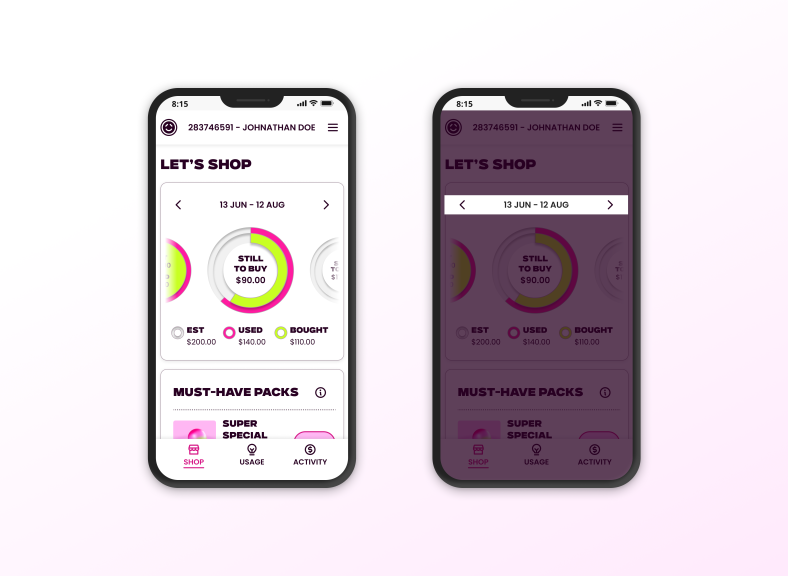
Note: If you’ve downloaded the app and linked your account, you’ll receive a push notification to let you know if you have a balance owing on your account. Once enabled, you’ll get this notification a few days after your Account Review period ends.
As of Feb 2026 push notifications aren't currently available but watch this space!
What happens at the end of my account review?
What happens at the end of my account review?
A couple of days after your Account Review period ends, we’ll email you if you haven’t bought enough Powerpacks to cover your usage and charges, or if your meter reads aren’t up-to-date.
What to do if your meter reads aren’t up-to-date
You can either:
- Enter a read by logging in to your desktop account or on our mobile app. More on entering a meter read. Bear in mind that if the meter reading you enter is higher than we’ve estimated, you may need to buy more power.
- Hold tight, and we’ll base your Account Review on an estimated reading. If we do this, we’ll update your account next time we receive an actual read
When will I be billed for power?
When will I be billed for power?
You can check when your Account Review period is by using the app or logging in to your desktop account. The circles will tell you when your Account Review period is. If you log in via desktop, the start date is circled in your Power Organiser (the calendar on the right on your ‘Balance’ page).
If you’ve downloaded the app and linked your account, you’ll receive a push notification to let you know if you have a balance owing on your account. You’ll get this notification a few days after your Account Review period ends.
We recommend downloading our free app so that you get these notifications on your phone.
How can I pay?
How can I pay?
By credit card – we accept Visa, American Express and Mastercard. Please note a 0.76% processing fee applies for credit card and debit card transactions.
By direct debit – If you set up a direct debit on your Powershop account you just need to provide us with your bank account number and we take care of the rest.
By internet banking – you can use internet banking to put money into your Powershop account at any time.
To do this, log in to your internet banking and follow your bank’s bill payment process – search for ‘Powershop’ as the biller. Our bank account number is 03-0502-0367558-003.
- In the ‘code’ field, enter your Powershop account number.
- In the ‘reference’ field, enter your name.
- In the ‘particulars’ field, you can leave it blank or type in ‘Powershop’.
Note: if you pay by internet banking we’ll still need you to supply an automatic payment method for your account (credit card or direct debit). Your internet banking payment will need to be made before payment is scheduled to be taken from your automatic payment method.
The Shop: If you have access to our online Shop, you can also buy Powerpacks using your internet banking. You’ll be given this option when you go to pay. More information about payment
How do I pay for powerpacks
How do I pay for powerpacks
When you confirm that you want to buy a Powerpack in the Shop, the default option will be to complete the transaction using your preferred payment method. You can nominate either a direct debit, debit card or credit card as your default payment method. Please note a 0.76% processing fee applies for credit card and debit card transactions.
How do I pay for powerpacks?
How do I pay for powerpacks?
When you confirm that you want to buy a Powerpack in the Shop, the default option will be to complete the transaction using your preferred payment method. You can nominate either a direct debit, debit card or credit card as your default payment method. Please note a 0.76% processing fee applies for credit card and debit card transactions.
What if I haven’t bought enough Powerpacks at the end of my Account Review period?
What if I haven’t bought enough Powerpacks at the end of my Account Review period?
If you haven't bought enough Powerpacks to cover you for your current Account Review period – don’t panic, we are not going to cut off your supply. We’ll buy your default Powerpack for you, to cover your power used. For most customers, this will be equal to the power you have used at your Standard Rate.
To get the most savings we recommend buying all the Staying Power and Special Powerpacks, 2x Future Packs six months in advance and then Value Powerpacks to cover extra usage.
We’ll always give you at least three days' notice before we debit any money from your preferred payment method. If paying on this date is not convenient, you can also move your payment date, read how.
Download our mobile app and you’ll also get a mobile alert at least three days before we make a transaction. We’ll let you know how much we’re going to take, and when.
Payment & Payment Methods
How can I pay?
How can I pay?
By credit card – we accept Visa, American Express and Mastercard. Please note a 0.76% processing fee applies for credit card and debit card transactions.
By direct debit – If you set up a direct debit on your Powershop account you just need to provide us with your bank account number and we take care of the rest.
By internet banking – you can use internet banking to put money into your Powershop account at any time.
To do this, log in to your internet banking and follow your bank’s bill payment process – search for ‘Powershop’ as the biller. Our bank account number is 03-0502-0367558-003.
- In the ‘code’ field, enter your Powershop account number.
- In the ‘reference’ field, enter your name.
- In the ‘particulars’ field, you can leave it blank or type in ‘Powershop’.
Note: if you pay by internet banking we’ll still need you to supply an automatic payment method for your account (credit card or direct debit). Your internet banking payment will need to be made before payment is scheduled to be taken from your automatic payment method.
The Shop: If you have access to our online Shop, you can also buy Powerpacks using your internet banking. You’ll be given this option when you go to pay. More information about payment
How do I pay for Powerpacks?
How do I pay for Powerpacks?
When you confirm that you want to buy a Powerpack in the Shop, the default option will be to complete the transaction using your preferred payment method. You can nominate either a direct debit, debit card or credit card as your default payment method. Please note a 0.76% processing fee applies for credit card and debit card transactions.
When is payment taken from my debit/credit card or bank?
When is payment taken from my debit/credit card or bank?
When you buy Powerpacks from the Shop, the money will be debited from your debit/credit card or bank account immediately or you can select Pay Later. If you choose to pay later, it will be charged to your default payment method at the end of your Account Review period (billing period). You can use online banking or a manual payment to pay it before then.
If we need to take payment following your Account Review, the money will be debited from your preferred payment method (i.e., either your bank account or your nominated debit/credit card) a few days after we send you your monthly Account Review email. We’ll tell you the exact date in your Account Review email. You’ll always have at least three days’ warning before we deduct the money.
If paying on the date we’ve scheduled is going to be a problem, you can move your payment date – read how.
Download our mobile app and you’ll also get a mobile alert at least three days before we make a transaction following your Account Review. We’ll let you know how much we’re going to debit, and when.
Can I move my payment date?
Can I move my payment date?
Yup! If a scheduled payment date (a payment on your account scheduled by Powershop) doesn’t suit, you can change the payment date. You can do this by logging in to your online account and going to the ‘Transactions’ tab. Then click on ‘Move payment date’ and follow the instructions. This button will only appear when a payment has been scheduled. There is a limit to how far you can move it.
Can I set up a regular payment for my power?
Can I set up a regular payment for my power?
Absolutely. You can set up a regular payment via internet banking.
To do this, log in to your internet banking and follow your bank’s bill payment process – search for ‘Powershop’ as the biller.
Our bank account number is 03-0502-0367558-003.
- In the ‘code’ field, enter your Powershop account number.
- In the ‘reference’ field, enter your name.
- In the ‘particulars’ field, you can leave it blank or type in ‘Powershop’.
If you set up a regular payment, you can choose an amount to credit onto your Powershop account each month. Your credit will appear on your Account Review that you receive each month.
Note: if you pay by internet banking we’ll still need you to supply an automatic payment method for your account (credit card or direct debit). Your internet banking payment will need to be made before payment is scheduled to be taken from your automatic payment method.
Can I pay power separately for each property I have?
Can I pay power separately for each property I have?
Yes. If you’d prefer to buy separate Powerpacks or make separate payments for different properties, we can set this up for you.
However, if all your properties are on one account, your Powerpacks will apply to all your properties.
Preferred payment methods and how to change payment methods?
Preferred payment methods and how to change payment methods?
You can nominate either a direct debit, debit card or credit card as your preferred payment method. Please note a 0.76% processing fee applies for credit card and debit card transactions. We’ll then use this payment method when an auto-payment is created on your account (for example, when you buy a Powerpack or when we buy your default Powerpack for you, if your usage exceeds Powerpacks purchased at the end of your Account Review period).
You can set up and edit your preferred payment method by going to ‘Payment Methods’ under ‘Settings’ in your desktop account. You can also add other bank accounts/cards.
-

need to refund a powerpack?
No worries - If you change your mind about buying a Powerpack you can refund the purchase yourself in the app within 48 hours of the original purchase. Outside of 48 hours and for customers that have been migrated to our new platform, you will need to give us a call instead.
Read more -

struggling with your bills? we can help
If you’re struggling to pay your electricity bills or think you will soon, we’re here to help keep the lights on whatever your situation. Together we’ll suss a payment plan that works for you and look at options to help.
Read more